What is an NPU, is an AI PC worth it, and can your laptop run AI locally?
TOPS numbers keep climbing in laptop ads, but when you try to run a model on your own machine, memory is usually what stops you.
On October 5, 2026, a San Francisco startup called Ghost raised an $11 million seed round to sell a $3,499 box with no screen, built to run a personal AI assistant at home. TechCrunch’s report is clear about what does the heavy lifting inside: an Nvidia graphics card, not an NPU. Meanwhile, laptop ads lead with NPUs and TOPS. Put the two side by side and you have the confusion behind most “AI PC” shopping questions. The NPU handles one kind of AI work, and running a chatbot model on your own machine depends on different hardware. Once that is clear, you know which lines of a spec sheet matter, and whether the computer you already own will do.
- What is an NPU in a laptop, and how is it different from a CPU or GPU?
- What does 40 TOPS mean? NPU numbers for current chips
- Copilot+ PC requirements, and what you actually get
- Does running an LLM locally use the NPU?
- How much RAM do you need to run AI locally?
- How to check whether your PC has an NPU
- Is an AI PC worth it? Decide by what you will use it for
- FAQ
What is an NPU in a laptop, and how is it different from a CPU or GPU?
NPU stands for neural processing unit: a block of the processor built for AI work. Most of what an AI model does, over and over, is multiply large batches of numbers and add the results. An NPU is designed for exactly that and does it on far less power than a CPU or GPU. Apple calls its version the Neural Engine, and every Mac with Apple silicon has one, starting with the M1.
Microsoft’s Windows 11 specifications page sums up the point of an NPU in three parts: some AI features can work without an internet connection, they use less power than on the CPU or GPU, and more of your data stays on the device. That makes it a good fit for small jobs that run in the background for hours, such as background blur and noise removal on video calls, live captions, and searching your own files by meaning.
| Part of the chip | Good at | Everyday examples | Power draw |
|---|---|---|---|
| CPU | Anything, but only a few tasks in parallel | Opening apps, browsing, office work | Medium |
| GPU | Massive parallel math, the most raw compute | Games, video editing, running LLMs locally | Highest |
| NPU | AI inference at low power | Background blur, noise removal, live captions, on-device search | Lowest |
Having an NPU does not make every AI app faster. Microsoft’s developer documentation says the NPU has to be specifically programmed for, and models usually need to be quantized to a lower-precision format such as INT8 first. When the NPU path does not work, Windows falls back to the GPU or CPU. Whether your software supports the NPU matters more than how fast the NPU is.
What does 40 TOPS mean? NPU numbers for current chips
TOPS means trillion operations per second, and vendors usually quote it at INT8, a low-precision format. The number 40 shows up everywhere because Microsoft made it the bar for a Copilot+ PC. Three things to keep straight before comparing.
Compare NPU figures only with NPU figures. Intel publishes two numbers: the NPU alone, and “platform TOPS” that add the CPU, GPU and NPU together. Core Ultra 200V has an NPU of up to 48 TOPS and up to 120 platform TOPS, of which the graphics alone account for up to 67. Set a platform figure against another brand’s NPU figure and the comparison is meaningless. Keep the precision the same, too: Qualcomm states INT8 for Snapdragon X2, while Apple never said what precision its 38 TOPS for M4 used. And from M5 on, Apple stopped publishing a Neural Engine TOPS number and talks instead about neural accelerators inside each GPU core, so Macs can no longer be compared with Windows laptops on this line at all.
| Chip | NPU (vendor figure) | Notes |
|---|---|---|
| Qualcomm Snapdragon X Elite / X Plus | 45 TOPS | Chips in the first Copilot+ PCs |
| Qualcomm Snapdragon X2 Elite / X2 Plus | 80 TOPS (INT8) | Announced September 2025, 78% more than the previous generation |
| Intel Core Ultra 200V (Lunar Lake) | Up to 48 TOPS | Up to 120 platform TOPS; do not mix the two |
| Intel Core Ultra Series 3 (Panther Lake) | Up to 50 TOPS | Launched at CES, January 2026 |
| AMD Ryzen AI 300 | 50 TOPS | Announced 2024 |
| AMD Ryzen AI 400 (laptops) | Up to 60 TOPS | Systems from Q1 2026 |
| Apple M4 | 38 TOPS (Neural Engine) | Precision not stated by Apple |
| Apple M5 and later | Not published | Apple now quotes GPU neural accelerators instead |
Once you are past 40 TOPS, a bigger number makes little difference you would notice day to day. Background blur and live captions either work or they do not, and above the bar they work. The gap between machines that actually shows up is in memory and graphics, covered below.
Copilot+ PC requirements, and what you actually get
“AI PC” has no fixed definition. The one with a published standard is Microsoft’s Copilot+ PC. Its Windows 11 specifications page lists three requirements on top of normal Windows 11: a processor with an NPU of 40+ TOPS, 16 GB of DDR5 or LPDDR5 memory, and a 256 GB SSD or UFS drive. The processors currently listed are AMD Ryzen AI 300 and 400 series, Intel Core Ultra 200V and 300V series, and Qualcomm Snapdragon X series. Microsoft adds that devices with less than 16 GB of RAM or smaller storage are not Copilot+ PCs, even if the NPU reaches 40 TOPS, and miss out on the features unique to them.
The main extras are below. Microsoft notes that availability varies by region and device.
- Improved Windows search, which finds files, photos and settings from a description rather than an exact file name.
- Click to Do, which brings up actions for text and images on your screen. Microsoft says the actions on offer vary by device, region and language, and some need a subscription.
- Recall, still in preview, which keeps snapshots of your screen so you can find things later. It needs Windows Hello Enhanced Sign-in Security.
- Live Captions translation, from 40+ languages into English and from 27 languages into Simplified Chinese.
- Windows Studio Effects. The basic set (automatic framing, background blur, eye contact and voice focus) needs only a 10+ TOPS NPU and a compatible camera.
- Cocreator in Paint and image creation in Photos, which need a Microsoft account and an internet connection for cloud safety checks.
A few features are limited to Snapdragon X machines, such as Generative fill in Paint, Relight in Photos and automatic super resolution for games. Microsoft says many of the features run without an internet connection once downloaded, and some need a Microsoft account.
On price, Microsoft’s US Copilot+ PC page on October 6, 2026 listed machines from $699.99, with Surface models from $1,049.99; prices move often. Before buying, check three lines on the spec sheet: NPU at 40 TOPS or more, at least 16 GB of memory, and at least 256 GB of storage. Most thin laptops have memory soldered to the board, so it cannot be upgraded later. If the budget allows, take the next memory tier up.
Does running an LLM locally use the NPU?
Usually not. The two most popular tools for running models on your own machine are Ollama and LM Studio. Ollama’s hardware support documentation lists Nvidia CUDA, AMD ROCm, Apple Metal and Vulkan, which are all graphics routes. On a Mac it uses the CPU and GPU of Apple silicon, and Intel Macs get the CPU only. The documentation has no NPU support to describe. Once a model is running, type ollama ps in the terminal and it shows whether the model sits entirely on the CPU or is split between CPU and GPU.
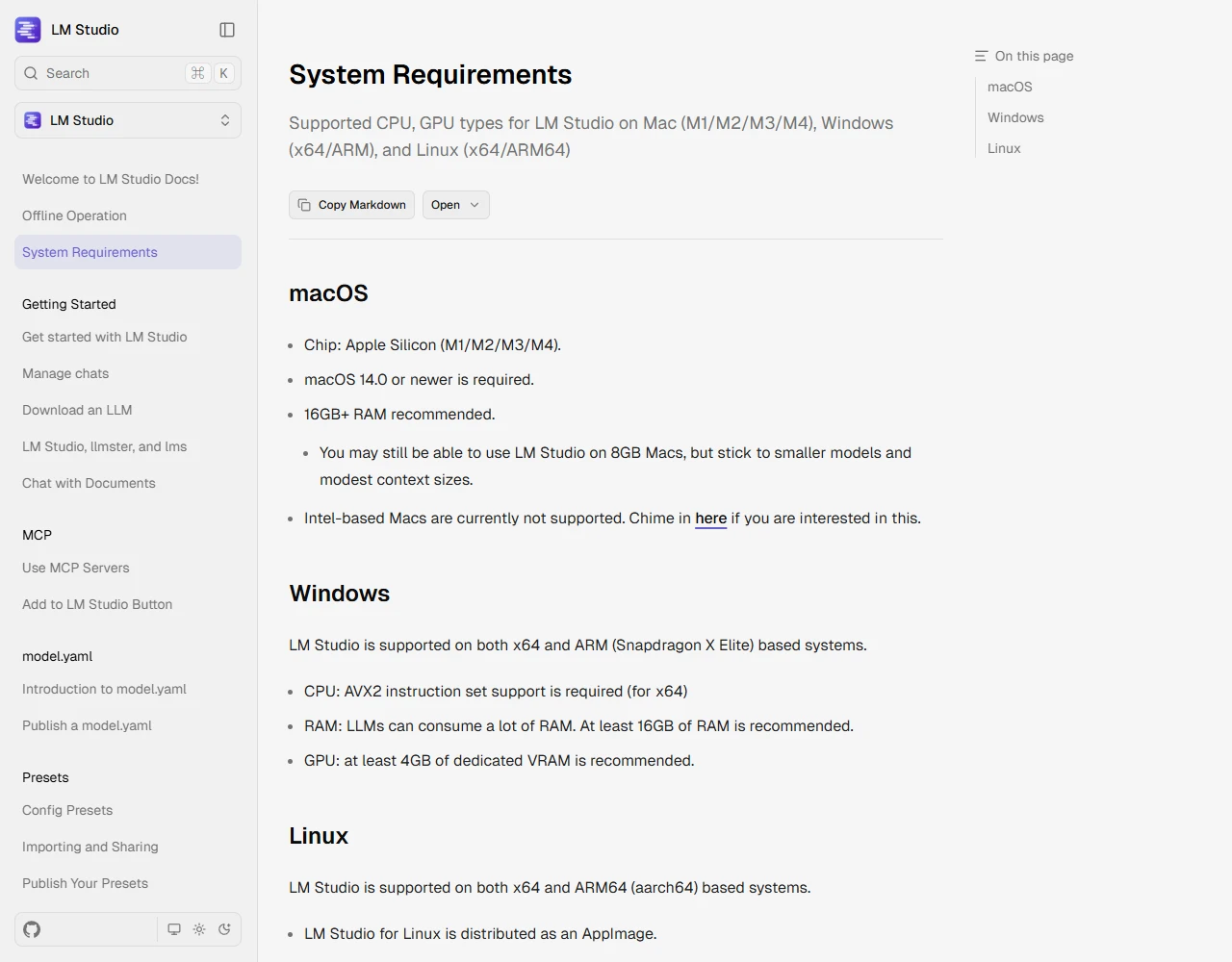
LM Studio’s system requirements page talks about memory and graphics too. On a Mac it needs Apple silicon (M1 to M4), with 16 GB or more recommended; 8 GB Macs can work with smaller models. On Windows it supports ordinary x64 PCs and ARM machines such as Snapdragon X Elite, x64 processors need AVX2, and it recommends at least 16 GB of RAM and 4 GB of dedicated VRAM.
There is an NPU route. Microsoft’s Foundry Local runs models on your machine, uses the GPU and NPU when they are available and falls back to the CPU, and installs on Windows, Apple silicon Macs and Linux. The catch is that a model has to be converted for that specific chip before the NPU can run it, so the choice of models is narrower than in Ollama or LM Studio. Ghost’s $3,499 box follows the same logic: to run models with tens of billions of parameters smoothly, it uses a graphics card with plenty of memory.
So if you want a chatbot model on your own machine, the questions are how much VRAM or memory you have and how fast it is. The NPU is not what decides it.
How much RAM do you need to run AI locally?
The whole model file has to fit in VRAM or memory, with room left over for the operating system, your browser and the conversation itself. Here are the default download sizes of the Qwen3 family in the Ollama library, checked in October 2026. Bigger files usually answer better and need more memory.
| Model | File size | Roughly what it needs (our estimate) |
|---|---|---|
| Qwen3 0.6B / 1.7B | 523 MB / 1.4 GB | Runs on an 8 GB machine; good for a first try |
| Qwen3 4B | 2.5 GB | Runs with 8 GB of RAM; 16 GB is comfortable |
| Qwen3 8B | 5.2 GB | 16 GB of RAM, or a GPU with 8 GB of VRAM |
| Qwen3 14B | 9.3 GB | Tight on 16 GB; 32 GB or 12 GB+ VRAM is safer |
| Qwen3 32B | 20 GB | 32 GB+ of RAM, or 24 GB of VRAM |
| Llama 3.1 70B | 43 GB | A Mac with 64 GB+ of unified memory, or several GPUs |
The last column is our own estimate, based on the file size plus a few gigabytes of headroom; no vendor publishes it. Two official reference points line up with it. LM Studio recommends at least 16 GB of RAM. Ollama’s README long advised at least 8 GB of RAM for 7B models, 16 GB for 13B and 32 GB for 33B; that line was dropped in a February 2026 release, but the proportions still hold.
Windows PCs and Macs behave very differently here. On a Windows PC with a dedicated graphics card, what counts is the card’s own VRAM. When a model does not fit, part of it moves to the CPU and everything slows down, which is what a large CPU share in ollama ps means. Apple silicon Macs use unified memory that the GPU can draw on directly, so a 32 GB or 64 GB Mac can often run a bigger model than a gaming laptop with 8 GB of VRAM.
The easiest test: install LM Studio or Ollama, download a 4B model and ask it a few questions. If the speed is fine, try 8B. If replies crawl out a word at a time and the fans roar, you have found your machine’s ceiling.
How to check whether your PC has an NPU
On Windows, open Task Manager and go to Performance. If NPU appears in the list on the left, select it to see its usage over time. To see which app is using it, go to the Processes tab, right-click a column header and add the NPU column; Microsoft says per-app NPU figures appear only on some newer devices. If there is no NPU entry, the CPU page under Performance shows your processor model, which you can look up in the table above.
On a Mac, open the Apple menu and choose About This Mac. If the Chip line says Apple M1 or later, the Mac has a Neural Engine. If it says Intel, it does not, and it cannot run Apple Intelligence; LM Studio does not support Intel Macs either.
Apple’s September 2026 support page lists Apple Intelligence on Macs with M1 or later, iPhone 15 Pro and Pro Max, and iPhone 16 and later, among other devices. It needs up to 8 GB of free storage, or up to 14 GB on some newer models. Apple notes that it is not currently available on devices bought in mainland China.
Is an AI PC worth it? Decide by what you will use it for
| What you want AI for | What to look at | Does the NPU matter? |
|---|---|---|
| ChatGPT, Gemini, Claude or other AI in a browser or app | It all runs on servers; any computer with a decent connection will do | No |
| Background blur, noise removal and live captions on calls | An NPU saves power and battery; the basic effects need 10+ TOPS | Helpful |
| Recall, Click to Do and the new Windows search | It must be a Copilot+ PC: 40 TOPS, 16 GB, 256 GB | Required |
| Running 8B to 14B chat models locally | 16 to 32 GB of memory; with a graphics card, its VRAM | Barely used |
| Running 70B-class models locally | A Mac with 64 GB+ of unified memory, or high-VRAM graphics | No |
| AI features in photo and video editors | Check whether the app’s own site says it uses the GPU or the NPU | Depends on the app |
If your current computer still works, there is no rush to replace it. Cloud AI asks almost nothing of your hardware, and if you are curious about local models, try a 4B model on the machine you already have. If you are buying anyway, spend on memory first, especially when it is soldered and cannot be added later. An NPU past 40 TOPS is enough; there is no need to pay extra for a few dozen more TOPS on the spec sheet. When a store pitches a laptop as an “AI PC”, ask for the NPU TOPS, the memory and the storage in writing, and check them against the three Copilot+ requirements above.
FAQ
NPU vs GPU: which matters more for AI?
It depends on the job. For always-on background features such as blur, live captions and on-device search, the NPU uses less power. For running a chatbot model locally, Ollama and LM Studio use the GPU, CPU and memory, and the more VRAM or unified memory you have, the bigger the model you can run. If you only use AI in a browser, neither matters much.
Is 16GB of RAM enough to run an LLM locally?
Enough for models around 8B, such as Qwen3 8B at 5.2 GB; 14B is a squeeze. LM Studio recommends at least 16 GB, and 8 GB Macs are limited to small models. For 30B and up you want at least 32 GB, and 70B-class models need a Mac with 64 GB+ of unified memory or several GPUs.
Can I add an NPU to an older PC?
No. The NPU is built into the processor, so neither laptops nor desktops can add one. A desktop can take a dedicated graphics card for running local models, which usually does better than an NPU anyway. Copilot+ features still require a processor with a built-in 40+ TOPS NPU, so a graphics card will not unlock them.
Do AI PC features work offline?
Some do. Microsoft says many Copilot+ features run without an internet connection once downloaded, and some need a Microsoft account; image creation such as Cocreator in Paint needs a connection for cloud safety checks. LM Studio can also run entirely offline once you have downloaded a model.
Is a Mac an AI PC?
Copilot+ PC is Microsoft’s standard for Windows machines, so Macs are not part of it. Every Mac with M1 or later has a Neural Engine and supports Apple Intelligence, and for local models the GPU can use the Mac’s unified memory directly, so a Mac with plenty of memory can run fairly large models.
Sources and further reading
- Microsoft, Windows 11 specifications and system requirements: the 40 TOPS, 16 GB and 256 GB minimums for Copilot+ PCs, supported processors and feature notes
- Microsoft Learn, Copilot+ PCs developer guide (updated August 2026): why software must target the NPU, quantization, and fallback to GPU or CPU
- Intel, NPU performance of Core Ultra 200V; Qualcomm, Snapdragon X2 Plus product brief; AMD, CES 2026 announcement; Apple, M4 announcement
- Ollama, hardware support and the Qwen3 model page; LM Studio, system requirements
- Microsoft Windows IT Pro Blog, Task Manager features for visibility into AI workloads (August 19, 2026); Apple, Apple Intelligence device requirements (September 2026)
- TechCrunch, At 19, Ghost founder raises $11M to build a $3,499 computer for your personal AI (October 5, 2026)
Updated: First published October 6, 2026. Chip specs and Microsoft’s feature list change quickly; changes will be logged here.

Fang Yu is the editor of FutureLens, turning published papers, official materials and public explanations into plain-language notes. He is most interested in the gap between a technology's public pitch and the evidence a careful reader can actually check. More about the author